How to Read METARs & TAFs
How to Read METARs & TAFs
Written by PPL Club
8 Apr 26 || 14 min read
METARs and TAFs are an essential part of aviation weather and a key topic for the UK PPL Meteorology exam. While the codes can look confusing at first, they follow a clear structure once you know what to look for. This guide explains how to read METARs and TAFs step by step, covering the key codes, weather information and forecast groups you'll need to understand for your PPL.
Key takeaways
The codes follow a consistent structure, making them easier to decode once you know what each section means.
METARs report observed weather at an aerodrome, while TAFs provide a forecast.
You'll learn how to read both METARs and TAFs using clear explanations and worked examples.
Both use standardised codes to describe conditions such as wind, visibility, weather, cloud, temperature and pressure.
Table of Contents
1.METAR Vs TAF: Understanding the Core Differences
3.Weather and Cloud Abbreviations 3.1 Weather Phenomena 3.2 Cloud Coverage 3.3 Cloud and Codes
4.Knowledge Check on METAR and TAF Reading 5. Visibility 5.1 The 10km + 5.2 Standard Visibility 5.3 RVR 5.4 'M' and 'P' Modifiers 5.5 Vertical Visibility 6. Temperature and Dew Point 6.1 Understanding the Group 6.2 The 'M' Prefix 6.3 Saturated Air 6.4 Carb Icing
7.Pressure Settings 7.1 What is QNH 7.2 High to Low, Look out Below 7.3 1hPa is approx 30ft 7.4 Standard Pressure 8.Where to find METARs and TAFs 9.FAQ
1. METAR vs TAF: Understanding the Core Differences
Before you start decoding abbreviations, you must nail the fundamental difference between these two reports. Mixing them up during flight planning is a critical, and potentially dangerous, error.
The METAR (The Actual) A METAR is a real-time observation of the current weather at a specific airfield.
When is it issued? Typically every 30 minutes at major UK aerodromes (often at 20 and 50 minutes past the hour).
How is it used? To confirm the exact conditions at your departure airfield right now, or to check your destination just before you begin your descent.
The TAF (The Forecast) A TAF is a highly accurate prediction of the future weather within a 5-nautical-mile radius of an aerodrome.
When is it issued? Generally every 3 to 6 hours. Depending on the size of the airfield, they are valid for a 9, 24, or 30-hour window.
How is it used? During pre-flight planning. It ensures your destination (and chosen alternate airfields) will legally meet Visual Flight Rules (VFR) at your Estimated Time of Arrival (ETA).
The Golden Rule of Aviation Weather: Never plan a cross-country flight using only METARs. A METAR tells you the sun is shining right now, but the TAF warns you a severe thunderstorm will arrive exactly when you plan to land. You must always consult both.
2. The Standard Sequence: How to Read a METAR or TAF
Both reports follow a rigid, internationally standardised sequence. This predictability is designed to help pilots extract critical data—like wind speed or cloud base—at a glance, even under the pressure of a busy cockpit.
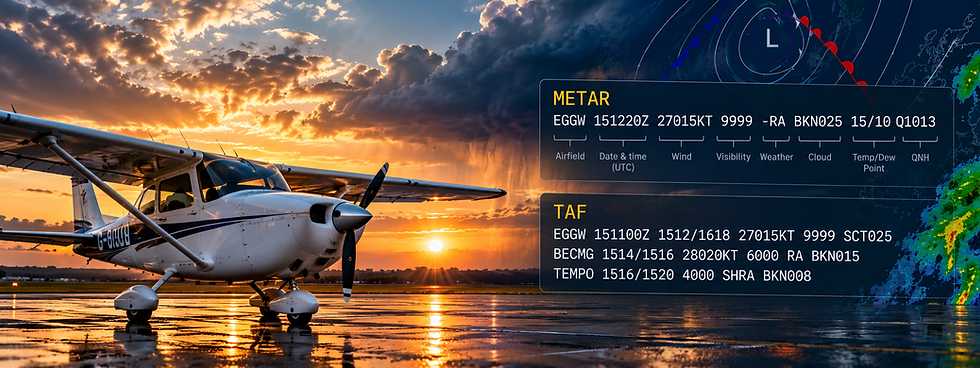
Let’s take a standard METAR string and dissect it piece by piece:
EGGW: The ICAO code for the airfield (London Luton)
151220Z: The Day and Time of the report. (The 15th of the month at 12:20 Zulu Time).
27015KT: The Wind. (Blowing from 270° at a strength of 15 knots).
9999: The Visibility. (9999 indicates 10km or more).
-RA: Significant Weather. (Light Rain).
BKN025: Cloud Coverage. (Broken clouds at an altitude of 2,500ft AGL).
15/10: Temperature and Dew Point. (Temp is 15°C, Dew Point is 10°C).
Q1013: Pressure Setting. (The QNH altimeter setting is 1013 hPa).
A TAF follows a very similar sequence, but because it is a forecast that can stretch out over a 30-hour period, it introduces "change groups".
EGNR: The ICAO code (Hawarden).
151101Z: The Day and Time the forecast was issued.
1512/1521: The Validity Period. (Valid from 12:00 Noon to 21:00 on the 15th).
17012KT 9999 SCT016: The Initial Forecast. (Wind from 170° at 12 knots, visibility 10km+, Scattered clouds at 1,600ft).
BECMG 1512/1515: 'Becoming'. A permanent change expected between 12:00 and 15:00.
25012KT: The newly established wind (250° at 12 knots).
TEMPO 1512/1514: 'Temporary'. A temporary fluctuation (lasting less than an hour) expected between 12:00 and 14:00.
4000 +SHRA BKN012: The temporary conditions. (Visibility drops to 4,000 meters, Heavy Rain Showers, Broken clouds at 1,200ft).
PROB30 TEMPO 1514/1518: A 30% chance of a temporary change between 14:00 and 18:00.
4000 +SHRA: The probable temporary conditions (4,000m visibility and Heavy Rain Showers).
BECMG 1517/1520 16009KT: Becoming between 17:00 and 20:00, the wind permanently shifts to 160° at 9 knots.
=: The end of the report.
Note: Some vital weather codes must be committed to memory. We will cover those shortly. For official definitions, always cross-reference the UK Met Office official code database.
3. Decoding the "Secret Code": Weather and Cloud Abbreviations
While the sequence of a METAR or TAF is predictable, the specific weather phenomena and cloud descriptions use a shorthand that can feel overwhelming during your first few weeks of ground school.
To help you master this for your exams, we have broken these codes down into two critical categories: Weather Phenomena (what is falling from the sky) and Cloud Coverage (how much of the sky is hidden).
3.1 Weather Phenomena (The Activity)
Weather codes are built like Lego bricks. You read them from left to right: Intensity first, then the Descriptor, and finally the Precipitation or Obscuration.
For example, +SHRA is a combination of Heavy (+), Showers (SH), and Rain (RA).
3.2 Cloud Coverage (The Octas)
In aviation weather, we imagine the sky directly above the aerodrome divided into eight equal slices, known as Oktas.
Your METAR or TAF will tell you exactly how many of those eight slices are obscured by clouds. This is a critical metric because it dictates whether you have an official "ceiling." A low ceiling can trap you, forcing you out of legal Visual Flight Rules (VFR) and into dangerous territory.
The Pilot's Rule of Thumb: A cloud layer does not officially constitute a "ceiling" until it covers more than half the sky (5 Oktas or more).
3.3 The "Perfect" Codes: CAVOK and NSC
Sometimes, the weather is so good the METAR uses a "catch-all" abbreviation to save space. These are the codes every VFR pilot wants to see before heading to the airfield.
CAVOK (Cloud and Visibility OK): This is the holy grail for PPL students. It guarantees three things: visibility is 10km or more, there are absolutely no clouds below 5,000 feet (or the minimum sector altitude), and there is no significant weather (like rain or thunderstorms).
NSC (No Significant Cloud): Used when there are no clouds below 5,000 feet and no dangerous towering cumulus or cumulonimbus clouds (TCU or CB). However, the conditions do not quite meet the strict criteria for CAVOK (for example, the visibility might only be 8,000 meters).
NCD (No Cloud Detected): You will only ever see this in an automated METAR (look for the word AUTO in the report string). It means the aerodrome’s ceilometer—a laser sensor that points vertically—has not detected any cloud directly above it.
The Trap of AUTO Reports: Be highly cautious with the NCD code. Because an automated ceilometer only looks straight up like a laser pointer, it can easily miss a massive bank of low cloud approaching from the side. If you see NCD on an AUTO report, always cross-reference it with the TAF to see what human forecasters actually expect in the wider area.
Lets Test Your Knowledge So Far
You will find below a METAR and TAF report with some questions to answer. Lets see how much you have retained thus far. Don't be disheartened if you don't score well, its a challenging topic to master and only practice will improve your scores.
5. Visibility: From 9999 to the RVR Trap
Visibility in a METAR or TAF is reported in metres using a simple four-digit code. However, just like cloud coverage, there are specific shorthand rules and a few nasty exam traps you must master to stay safe in the circuit.
5.1 The "10km Plus" Rule (9999)
In the UK, the maximum general visibility reported in a standard weather string is 9999.
The Meaning: This does not mean the visibility is exactly 9,999 metres. It is the universal aviation code for 10 kilometres or more.
Operational Tip: If you see 9999, you are generally looking at a solid "Go" day for VFR (Visual Flight Rules) cross-country navigation—provided the cloud base isn't sitting on the deck!
5.2 Standard Visibility (Below 10K)
When the general visibility drops below 10km, the METAR simply reports the actual measured value in metres using four digits.
7000: 7 kilometres
1500: 1.5 kilometres
0500: 500 metres (Danger zone: This is strictly Instrument Flight Rules (IFR) territory!)
5.3 The RVR Trap (Runway Visual Range)
As a PPL student, you might occasionally spot a strange code appearing right after the main visibility, such as R23/1000.
This is the Runway Visual Range (RVR). You will only ever see this code appear when the general horizontal visibility drops below 1,500 metres.
The Code Format: R [Runway Designator] / [Visibility in Metres]
Example: R05/1100 means the visibility specifically looking down Runway 05 is 1,100 metres.
The PPL Exam Trap: RVR vs. General Visibility RVR is measured by highly calibrated laser sensors (transmissometers) positioned right alongside the runway. Because the sensors are aided by high-intensity runway lighting, the RVR is often higher than the general visibility.Never assume the RVR represents the visibility you will have once you climb away from the runway environment. Once you are in the air, you are back to relying on the (usually much lower) general visibility.
5.4 M and P Modifiers
If the visibility hits the very limit of what the airfield's equipment can physically measure, the report will attach a modifier to the front of the number:
M (Minus): e.g., M0050 means the visibility is less than 50 metres.
P (Plus): e.g., P1500 means the visibility is greater than 1,500 metres (you will usually only see this P modifier used in RVR reports).
5.5 Vertical Visibility (VV): When the Sky is Obscured
When the sky is completely hidden—usually by thick fog, smoke, or heavy blowing snow—the observer or ceilometer cannot detect a traditional cloud base. Instead, the report gives you the Vertical Visibility.
The Code Format: VV followed by three digits (representing hundreds of feet, exactly like standard cloud reporting).
Example: VV002 means you can only see straight up for 200 feet before the fog completely blinds you.
The "Blind" Code (VV///) If you see VV/// on a weather report, it means the sky is totally obscured, but the equipment cannot determine the actual vertical visibility. For a VFR student pilot, this is the ultimate "No-Go" code. Do not even think about untying the aircraft.
6. Temperature, Dew Point, and the Saturated Air Danger
Near the end of every METAR string, you will find a two-number group separated by a forward slash (e.g., 15/12). These represent the air temperature and the dew point, both measured in degrees Celsius (°C).
6.1 Understanding the Numbers
The First Number (15): The ambient outside air temperature (Dry Bulb).
The Second Number (12): The Dew Point. This is the exact temperature the air must be cooled to for it to become 100% saturated with moisture.
6.2 The "M" Prefix (Sub-Zero)
In the UK, especially during frosty morning flights, you will frequently see the letter M. In aviation weather, M stands for Minus.
02/M01: The air temperature is 2°C and the dew point is -1°C.
M03/M05: Both the temperature and dew point are below freezing.
6.3 The "Danger Zone" and Temperature Spread
The numerical difference between the temperature and the dew point is known as the "Spread." This is the single most important number for a VFR pilot's situational awareness.
The Pilot’s Rule of Thumb: The 2°C Spread If the spread is 2°C or less, the air is highly saturated. You are in the "Danger Zone" for the rapid formation of fog, mist, or low-level stratus clouds.If you see 10/10 in a METAR, the air is fully saturated. If there is even a slight drop in temperature, expect the visibility to drop to zero almost instantly.
6.4 The Invisible Killer: Carburettor Icing
For students flying classic training aircraft (like the Cessna 152 or Piper PA-28), the temperature/dew point relationship is your primary warning indicator for Carburettor Icing.
Carb ice doesn't just happen in the winter; it is actually most dangerous on warm, humid UK summer days. If the dew point is high and the temperature is between +5°C and +25°C, you are at high risk of ice forming in the venturi. This can lead to a total engine failure, particularly during a descent or at low power settings.
Want to see how this temperature spread affects your flight in real-time? Plug your METAR numbers into our free Cloud Base Calculator to instantly find out exactly where the clouds will form.
7. Pressure (QNH): The Altimeter Setting
At the very end of a METAR (and occasionally in a TAF during significant weather changes), you will find the pressure setting. In the UK and Europe, this is always preceded by the letter Q.
7.1 What is QNH?
QNH represents the atmospheric pressure at the airfield, mathematically adjusted down to Mean Sea Level.
The Code Format: A Q followed by four digits.
The Unit: We use Hectopascals (hPa) in the UK (formerly known as Millibars).
Example: Q1013 means the sea-level pressure is 1,013 hPa.
7.2 The Danger: "High to Low, Look Out Below"
This is the most famous rhyme in aviation for a reason. Atmospheric pressure is constantly changing as weather systems move across the country.
The PPL Exam Trap: Altimeter Over-Reading If you fly from an area of high pressure into an area of low pressure without updating your altimeter to the current QNH, your altimeter will over-read. It might say you are safely at 2,000 feet, but because the air is "thinner", your aeroplane is actually much lower than the instrument suggests.
7.3 The "1 hPa = 30ft" Rule
To pass your PPL Skills Test and your Meteorology exam, you must understand the relationship between pressure and height. In the lower levels of the atmosphere, 1 hPa is equivalent to approximately 30 feet.
If the QNH drops by just 10 hPa during your flight and you fail to update your altimeter sub-scale, you will be 300 feet lower than you think you are. When you are flying a low-level circuit or trying to stay under controlled airspace, 300 feet is a massive margin of error.
7.4 Standard Pressure (1013 hPa)
When you climb above the Transition Altitude (which varies across the UK but is often 3,000ft outside of controlled airspace), you stop using the local QNH.
Instead, you switch your altimeter to the Standard Pressure Setting (SPS) of 1013 hPa.
This ensures all aircraft in the cruise are using the exact same pressure reference point, preventing mid-air collisions. Your altitude is then legally referred to as a Flight Level.
Example: With 1013 hPa set, an altimeter reading of 4,500ft is transmitted over the radio as Flight Level 45 (FL045).
Where to find Official UK METARs and TAFs
Do not rely on generic smartphone weather apps to plan a flight. The BBC Weather app will not give you the cloud base, dew point, or QNH pressure data required to safely (and legally) operate an aircraft.
For pre-flight planning, you must use official aviation sources:
The Met Office Aviation Service: For UK aviation weather information, use official aviation weather services and appropriate flight-planning sources. The Met Office provides UK aviation METARs, TAFs and other aviation weather information through its aviation services.
What is MAVIS? The Met Office uses the Meteorological Aeronautical Visualisation Service (MAVIS) to provide these reports. If you haven't heard of it yet or don't know how to set up your free account, we covered exactly how to navigate it in our recent MAVIS Briefing Guide.

Frequently Asked Questions
What is the main difference between a METAR and a TAF?
The simplest way to remember it is: METAR is history; TAF is the future.
A METAR (Meteorological Aerodrome Report) is an observation of the actual weather conditions at a specific time.
A TAF (Terminal Aerodrome Forecast) is a prediction of what the weather is expected to be over a set period (usually 9, 24, or 30 hours).
How often are METARs and TAFs updated in the UK?
In the UK, METARs are typically issued every 30 minutes (at 20 and 50 minutes past the hour). However, if weather conditions change significantly between these times, a SPECI (Special Report) may be issued. TAFs are updated every 3 or 6 hours depending on the size of the airport and the length of the forecast.
What exactly does CAVOK mean for a pilot?
CAVOK stands for Cloud and Visibility OK. To meet this strict standard, three conditions must be met simultaneously:
Visibility is 10km or more.
No clouds exist below 5,000 feet (or the highest Minimum Sector Altitude).
There is no significant weather (e.g., no rain, thunderstorms, or mist).
At what point does a cloud layer become an official "ceiling"?
A "ceiling" is defined as the height above the ground of the lowest layer of clouds that is reported as Broken (BKN) or Overcast (OVC).
FEW (1-2 octas) and SCT (3-4 octas) do not constitute a ceiling. This distinction is vital for VFR pilots who must maintain specific vertical clearances from cloud bases.
Why do some METAR reports say "AUTO"?
The AUTO tag indicates that the report was generated by an automated weather station without a human observer present to verify the data. While modern sensors are highly accurate, they use a "vertical-only" laser to measure clouds. This means they might miss a cloud bank approaching from the side, which is why automated reports often include the code NCD (No Cloud Detected).
What do PROB30 and PROB40 mean in a TAF?
These codes indicate the probability of a temporary change in weather conditions occurring during a specific timeframe.
PROB30: A 30% chance (unlikely but possible).
PROB40: A 40% chance (nearly as likely to happen as not). If the probability is 50% or higher, the TAF will not use a "PROB" code; it will instead use BECMG (Becoming) or TEMPO (Temporary).
Free PPL Tools
Related Guides

UK PPL Air Law: Complete Guide to the Air Law Exam

PPL Performance Calculations

PPL Navigation Exam Questions Explained

PPL Meteorology Revision That Gets Results
Are Mock Exams Harder Than Real Exams?
UK PPL Exam Simulator: How to Prepare for Your Theory Exams
PPL Theory Practice Questions That Work
How to Pass the 9 UK CAA PPL e-Exams | 2026 Study Guide

How to Read METARs & TAFs

UK CAA Partial Power Loss Explained

How to Get a UK CAA Class 2 Medical
How Much Does a Private Pilot Licence (PPL) Cost in the UK? (2026 Ultimate Guide)

The Pilot's Ultimate Guide to Land and Sea Breezes